The Keyword Booster (AI Fine-Tuning)
Teach the AI the names and terms your church uses so they are transcribed correctly — how many keywords you can add, and how to start with our ready-made biblical list.
Written By Dennis Dueck
Last updated About 2 months ago
Teaching the AI the words your church uses
The AI listening to your service knows ordinary speech very well. What it does not know is that your church says Habakkuk, Gemeindeleiter, or the name of the village up the road.
The Keyword Booster is where you tell it. Give it a list of the words that matter to you, and it will recognise them instead of reaching for something that merely sounds similar.
This is a mid-week job. Twenty minutes once, then a few additions a month, and the quality of every service afterwards improves.
Where can I find the Keyword Booster?
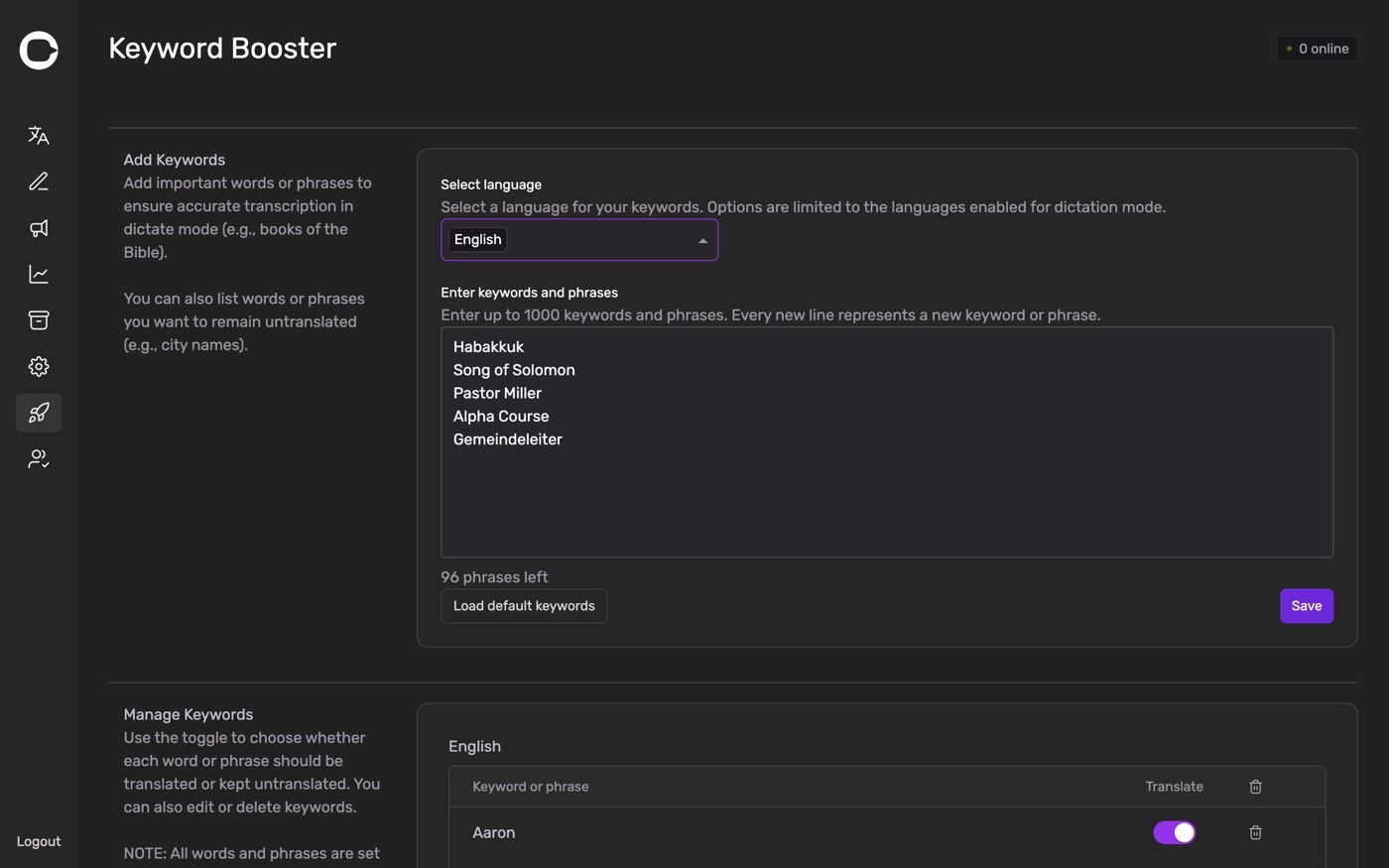
Go to https://admin.churchtranslation.org/keyword-booster, or click Keyword Booster in the sidebar.
What to put in it
Two different jobs, both done with the same list.
Words you want spelled correctly. Biblical names, books of the Bible, Greek or Hebrew terms, theological words, the names of your staff and your buildings. Anything the AI is likely to mishear because it is rare in everyday speech.
Words you want left alone. Place names, your church's own name, the name of a ministry or a course. Adding these keeps them intact instead of having them translated into something well-meaning and wrong — a village called Hope should stay Hope, not become Esperanza.
Adding your keywords
Choose the language at the top. This is the language you dictate in, not the ones you translate into — the list only shows your speech-to-text languages.
Type into the box, one keyword or phrase per line.
Click Save.
Short phrases are fine and often better than single words: Song of Solomon works better as one line than as three.
The page tells you where you stand as you type — Enter up to N keywords and phrases above the box, and a running N phrases left below it.
How many you can add
It depends on the language you dictate in, because different languages run on different speech engines behind the scenes. Depending on yours, the limit is 100, 500 or 1,000 keywords.
You do not have to work out which. The page shows your actual limit for the language you have selected, and counts down as you add. If you are near the limit, drop the words that are already recognised reliably — you gain nothing by listing Jesus.
Each language keeps its own separate list. If you preach in German and English, fill in both.
Start with the ready-made list
Click Load default keywords and we add a curated list of biblical names and terms for you. It is the fastest possible start, and it is free.
Ready-made lists exist for Danish, German, English, Spanish, French, Italian and Portuguese. For any other language you will see There are no default keywords for this language — write your own list instead, starting with the twenty words your church says most often.
Two things worth knowing:
The default list deliberately leaves room for your own words. It does not fill your limit.
Loading it adds to what is already in the box rather than replacing it, so your own words are safe.
The defaults cover Scripture. They cannot know your village, your pastor's surname, or the name of your Thursday group. Those are the ones that matter most to the people listening, so add them yourself.
Managing what you have added
The Manage Keywords section below shows everything currently saved for the selected language, so you can review and remove individual entries.
Adding the same word twice does nothing — duplicates are ignored, whatever the capitalisation and any stray spaces, so pasting a list you have already partly added is safe.
Building a good list
Listen to last week's archive. The mistakes are right there, already written down. Ten minutes of reading gives you a better list than an hour of guessing.
Add names as they come up. A guest preacher next month? Add their name this week.
Write words as you want them spelled. Capitalisation and accents included — that is what appears in the transcript.
Don't add ordinary words. Church, pray, worship are already recognised. Spending your limit on them takes room from the words that need it.
Review it once a term. Series come and go, and so do the words that go with them.
If a word still comes out wrong
Check you added it to the right language. This is the most common cause by far.
Say it clearly and slightly slower. Even with the keyword loaded, a word swallowed at the end of a sentence is hard to catch.
Check your microphone. No word list can rescue poor audio — see Equipment Checklist: What You'll Need.
Use Prepared Text for the passage that really matters. If a reading has to be exactly right, type it in advance on the Preparations page instead of relying on dictation.
Was this helpful?
Still need help? Ask the team