Your First Sunday: A 15-Minute Rehearsal Guide
A timed rehearsal to run mid-week with a laptop and your own phone, so your first real service is calm — plus a printable Sunday morning checklist.
Written By Dennis Dueck
Last updated About 2 months ago
Fifteen minutes now, so Sunday is calm
Do this once, in the week, in an empty room. You need a laptop and your own phone.
By the end you will have seen the whole thing work with your own words, which is the only thing that actually removes the nerves. Nothing here costs more than a few cents, and your free allowance covers it comfortably.
Do it in the room you will actually use, plugged into the actual desk. Half of what goes wrong on a Sunday is the cable, and the cable is only discoverable in the room.
Minutes 1–4: Set up the dashboard
Sign in at https://admin.churchtranslation.org and go to Settings.
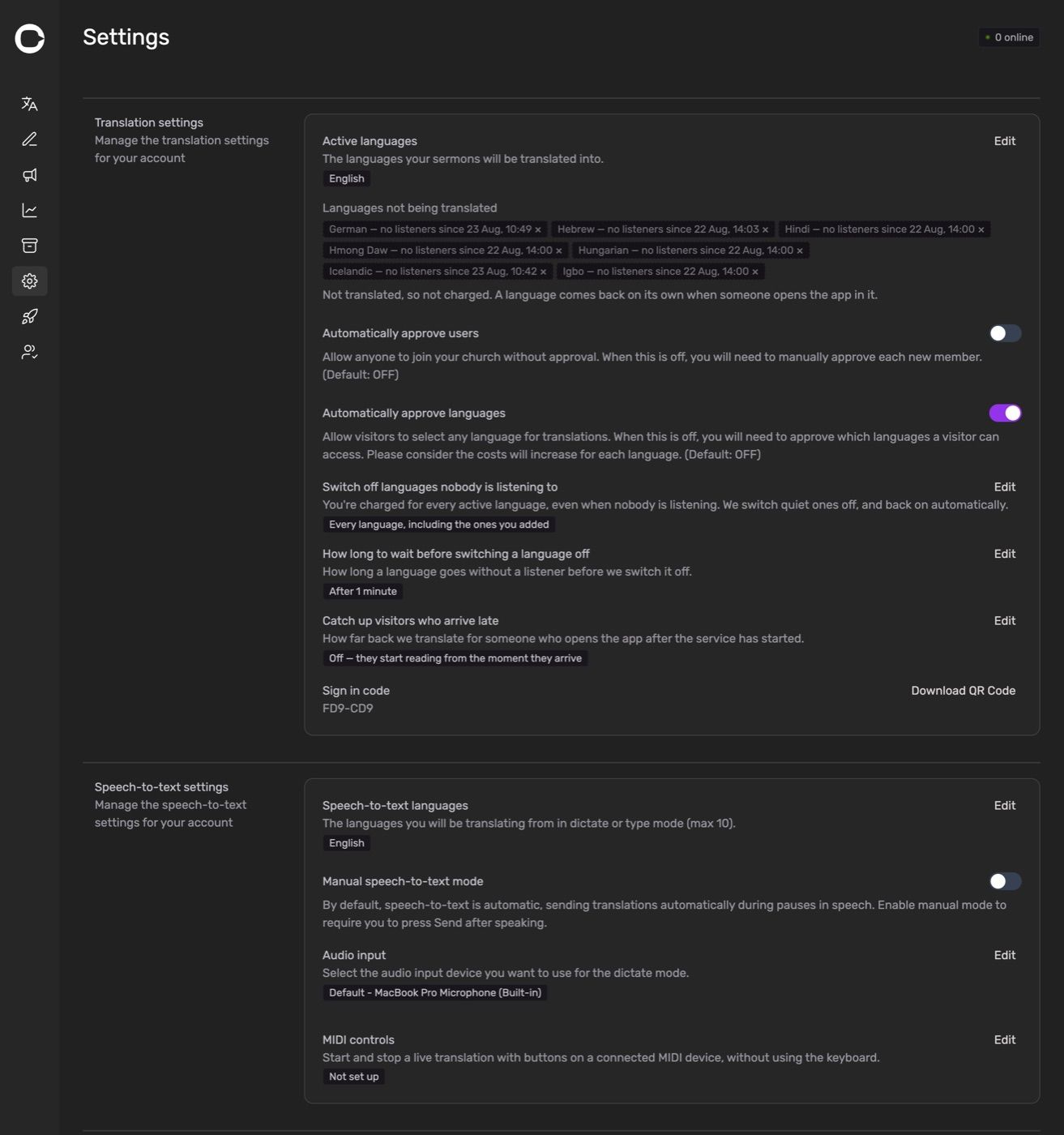
Under Speech-to-text settings:
Speech-to-text languages → click Edit and choose the language your preacher actually speaks. It defaults to English, and this is the single most common thing left wrong.
Audio input → click Edit and choose the microphone or desk feed. If the browser has not asked for microphone permission yet, it will now — say yes.
Under Translation settings:
Activated languages → add the one or two languages you know you need. Not eight. You can add more at any moment, including during a service.
Sign in code → write the six characters down, or click Download QR Code.
Minutes 5–7: Join as a visitor, on your own phone
This is the part people skip, and it is the most valuable four minutes of the exercise. You need to see what your congregation sees.
On your phone, open app.churchtranslation.org.
Tap Join church and enter your six-character code — or tap Scan QR code and scan the one you just downloaded. Either signs you in as a guest.
Open Settings on the phone and set Language to one of the languages you activated. Pick one you can judge, or one a colleague can.
Your phone should now say Translation begins the moment a speaker starts talking on stage.
Put the phone down where you can see it, next to the laptop.
Minutes 8–11: Say something
Back on the laptop, go to the Translation page.
Check the bottom left says Dictate.
Click the microphone button. It turns red, and a timer starts.
Talk. Not a test count — talk the way your preacher talks. Read a paragraph of last week's sermon aloud at normal pace.
Watch two things at once: the text appearing on the laptop, and the translation appearing on your phone a moment later.
Watch for these while you talk:
Does it hear you cleanly, or is it guessing? If it is guessing, your microphone is too far away or the feed is too quiet.
Are names coming out right? Note down every one that does not — that list is your Keyword Booster homework.
Does the phone keep up? It should be a second or two behind, no more.
Click the red stop button when you have had enough.
If nothing appeared on the laptop at all, work through Sunday Morning Troubleshooting — the microphone section covers every cause.
Minutes 12–14: Try the other two ways
You will not use these every week, but knowing they exist is what makes you calm when the audio fails.
Type mode. Click Type at the bottom of the box, type a sentence, press Shift + Enter. It appears on your phone. This is your fallback if the microphone dies mid-service — a volunteer can type a summary and nobody is left out.
Prepared text. If your preacher gives you a script, put it in the Preparation page in advance and double-click each snippet to send it. It is the most accurate option because nothing is being misheard. See Preparing for Sunday.
Minute 15: Look at what you produced
Archive → your test service is there. This is what your congregation reads during the week.
Statistics → Cost to date shows what those few minutes cost. It will be a very small number, and seeing it is oddly reassuring.
Then, before you close the laptop: open the Keyword Booster, choose your language, click Load default keywords, and add the names you noticed going wrong. Ten minutes here improves every service you ever run.
Your Sunday morning checklist
Print this, or put it on the desk.
Twenty minutes before
Open https://admin.churchtranslation.org/translation and sign in.
Check the microphone shown at the bottom right of the Sermon Translation box is the right one.
Check the language shown next to it is the language being preached.
Glance at the trial or cost counter at the top. No surprises.
Have the QR code visible — on the screen, in the bulletin, or printed at the welcome desk.
As the service starts
Click the microphone button. Check it is red.
Watch the first two or three sentences arrive before you look away.
During
Accept join and language requests as they appear in the notification area.
Glance at Users Online occasionally. It is the encouraging bit.
At the end
Click stop.
Close the projector window if you opened one — it keeps a language switched on until you do.
Was this helpful?
Still need help? Ask the team